
Dependencies #
Real projects have order — you can't test before you build. Link tasks together so Ingantt calculates the right sequence and shifts everything automatically when one task changes.
Predecessors and Dependencies #
When you link tasks using the Link selected tasks button on the toolbar, you create a dependency between the tasks. The dependency is called Finish to Start, and it is one of four dependencies available:
| Type | Description |
|---|---|
| Finish to Start | The second task can start once the first task finishes. |
| Finish to Finish | The second task finishes when the first task finishes. |
| Start to Finish | The second task finishes when the first task starts. |
| Start to Start | The second task starts when the first task starts. |
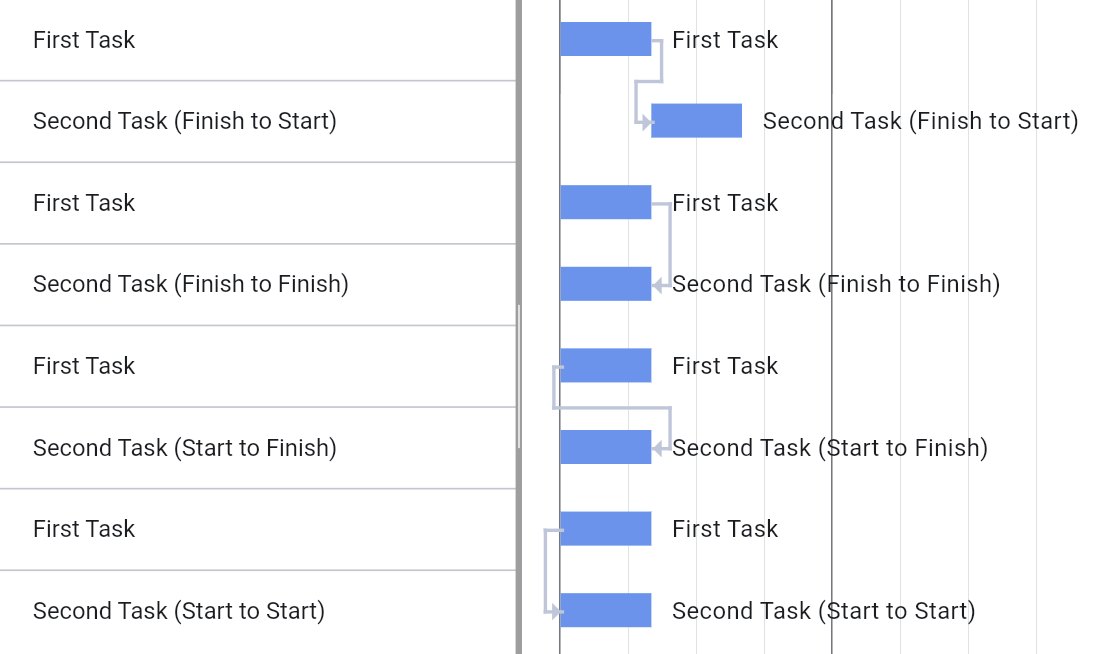
To assign predecessors and edit dependencies, use the Predecessors tab of the Task Properties dialog.
Lag and Lead Time #
Sometimes you might need to set some waiting time between two dependent tasks.
Let's say your first task is "Paint the wall" and your second task is "Hang pictures on the wall." These tasks are linked (have a Finish to Start dependency). It's not possible to hang pictures until the paint is dry, so you need to wait. To reflect this in your schedule, set the Lag (for example, 2 days) for the dependency between the two tasks.

Lags can also represent the opposite scenario — when a dependent task should start before its predecessor finishes. To set this, make the Lag negative (for example, -1 day). This is called lead time.
To set lag or lead time, select the predecessor on the Predecessors tab of the Task Properties dialog and click the Edit button.
Lags can be set in hours, days, weeks, months, or as a fraction of the predecessor task's duration (for example, 50%).
Circular Dependencies #
If you accidentally create a circular dependency — for example, making two tasks predecessors of each other — Ingantt detects it and reverts the last action. This applies to complex circular chains as well.
When you open a project file that contains circular dependencies, Ingantt automatically removes the problematic links so the project can be scheduled. A warning message shows how many circular dependency links were removed during import.